
WilsonAmplifiers.com is an eCommerce website and an authorized reseller of Wilson Electronics cell phone signal booster systems. The company offers a complete line of products that amplify the weak signal and improve cellular reception in commercial buildings, homes, and vehicles. The company is based in Houston, Texas.
The optimization of the shopping cart and checkout experience was a part of the larger project - the entire WilsonAmplifiers.com site redesign.

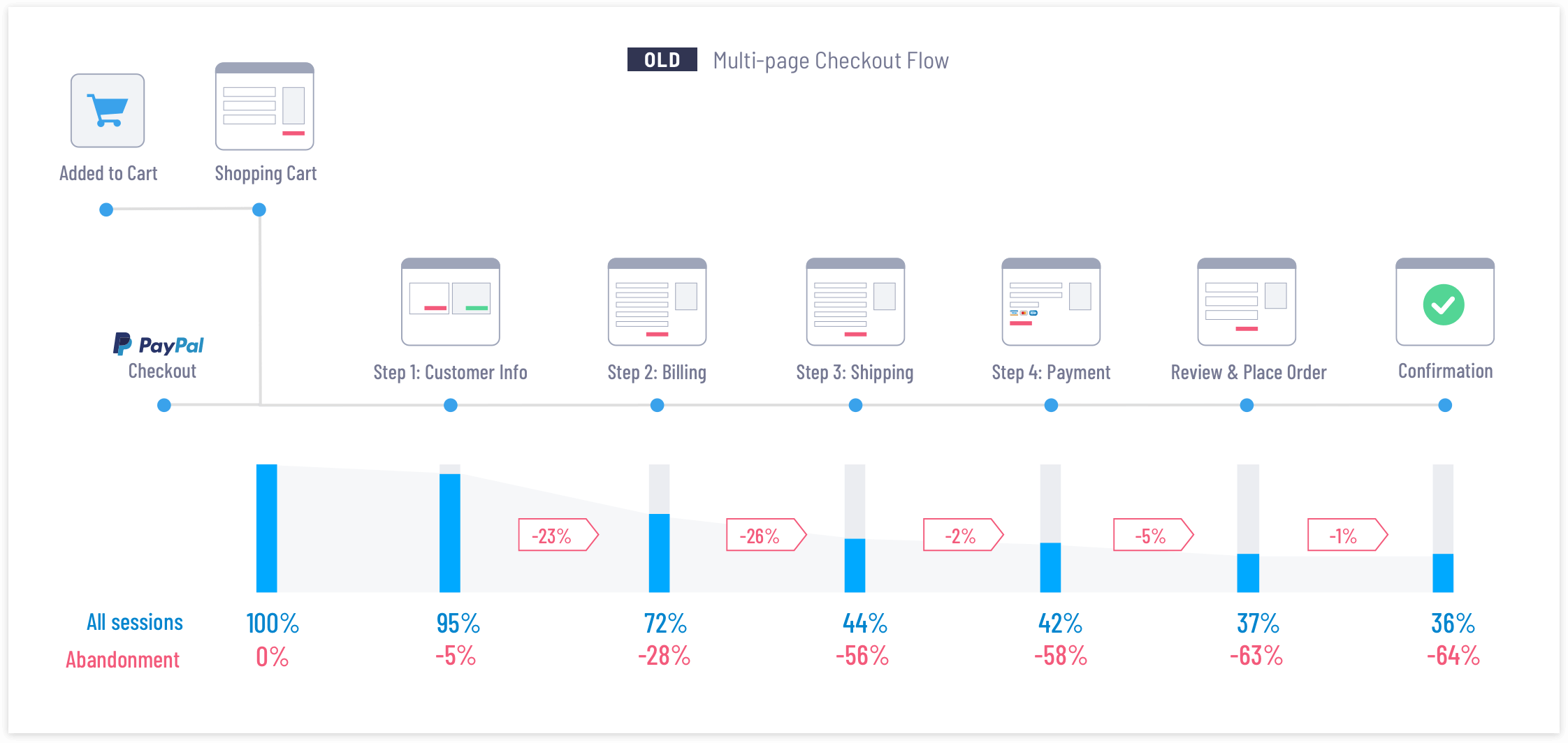
The old shopping cart and checkout had a high cart abandonment rate and several key metrics indicated the overall decline in the checkout performance. Google Analytics showed that more and more people were using mobile devices for shopping and checkout. But the low mobile conversion (at average 1.8%) indicated that there were some serious usability issues that prevented people from going through mobile checkout and placing orders online.
- A multi-step layout spread out into 5 separate pages
- Convoluted and complex mobile checkout experience
- Average checkout abandonment rate is over 60%
- High volume calls to the customer support hotline
- Long input forms with unnecessary fields
- Issues with correcting previously entered information
I was a lead User Experience designer and was responsible for leading the redesign efforts and improving the shopping cart and the checkout process user experience.
I worked closely with a director of marketing, the development team, and a copywriter.
To understand the business objectives I conducted interviews with stakeholders. The key concerns were the cart abandonment rates and a high volume of expensive calls to customer support. The old checkout process was too complicated and many customers abandoned it and chose to call and place their orders online. The stakeholders tasked me to figure out how to optimize and simplify the existing checkout process and make it more intuitive and effortless for the customers.
Google Analytics showed a number of abandoned transactions. I had to investigate and find out why the customers decided not to continue with the purchase, at what point they left, and what made them lose confidence to make the purchase and complete the order online. I started with a review of the old checkout metrics and the flow, focusing on steps that showed a significant spike in the checkout abandonment.
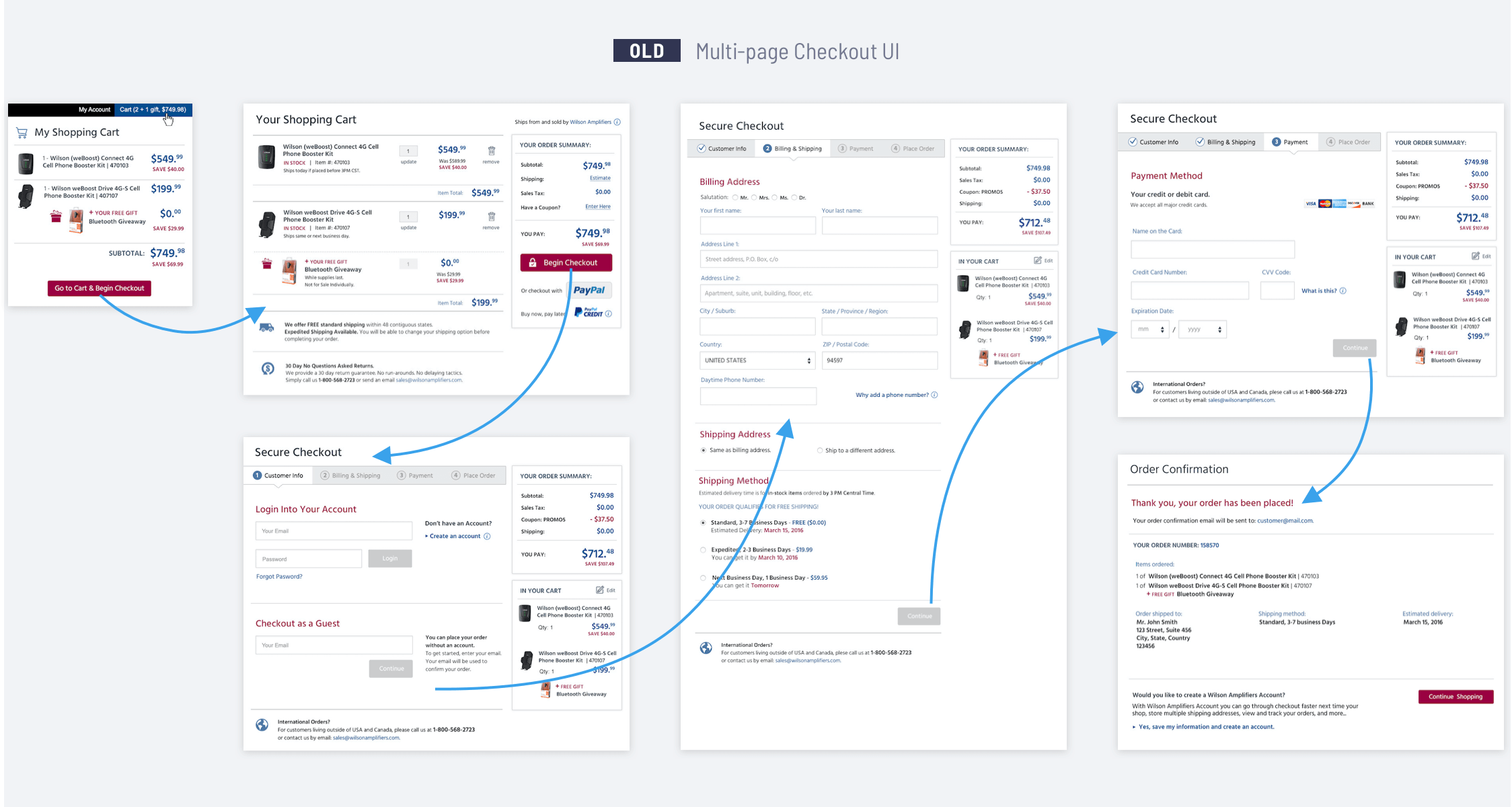
I talked to the customer support team and asked them about common complaints and frustrations that people had about the checkout. I also listened to recordings of customers’ calls. The top 3 pain points were: 1) lack of payment options, 2) uncertainty about shipping speed & cost, and 3) unwillingness to register with the site at the beginning of the checkout.
I had several meetings with the developers to make sure I was aware of any technical limitations. WilsonAmplifiers used the BigCommerce platform for their eCommerce store implementation. The BigCommerce platform offered several checkout templates. Developers and I discussed a possibility to design and implement a custom shopping cart and checkout solution. However, due to a tight schedule, we agreed to use one of the BigCommerce templates, but rework and refine it, so the shopping cart and checkout experience would be more in line with our audience needs and the company’s business goals.
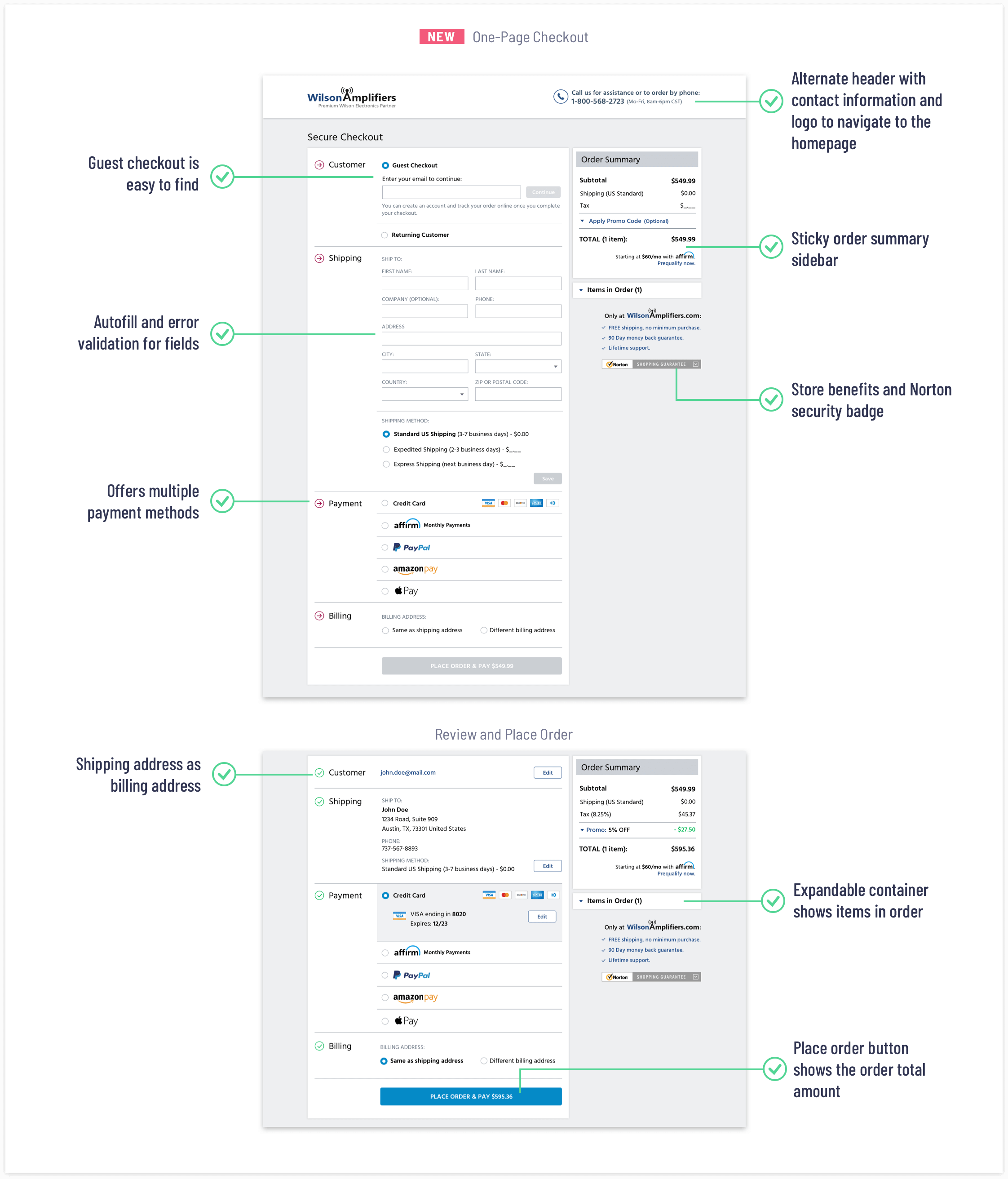
My intention was to make the shopping cart and checkout experience effortless and easy. I wanted to reduce the overall checkout process complexity, eliminate multiple steps, optimize input forms, and have a clean layout, and error-free transactions. The optimization and quality I was aiming for should communicate to the customers that this is a trustworthy store and ordering online is easy and secure.
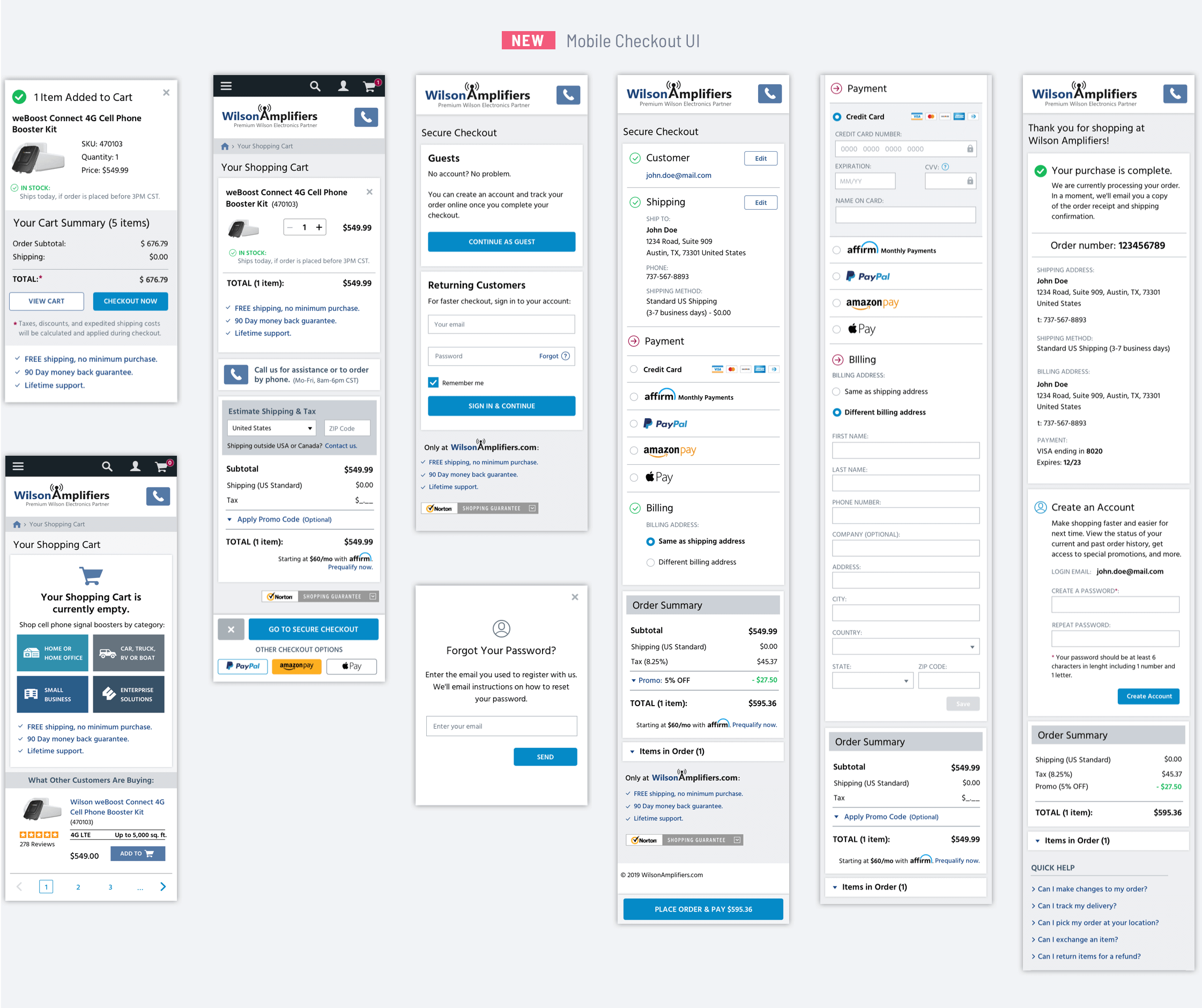
- Focus on mobile-first approach and create responsive, flexible design.
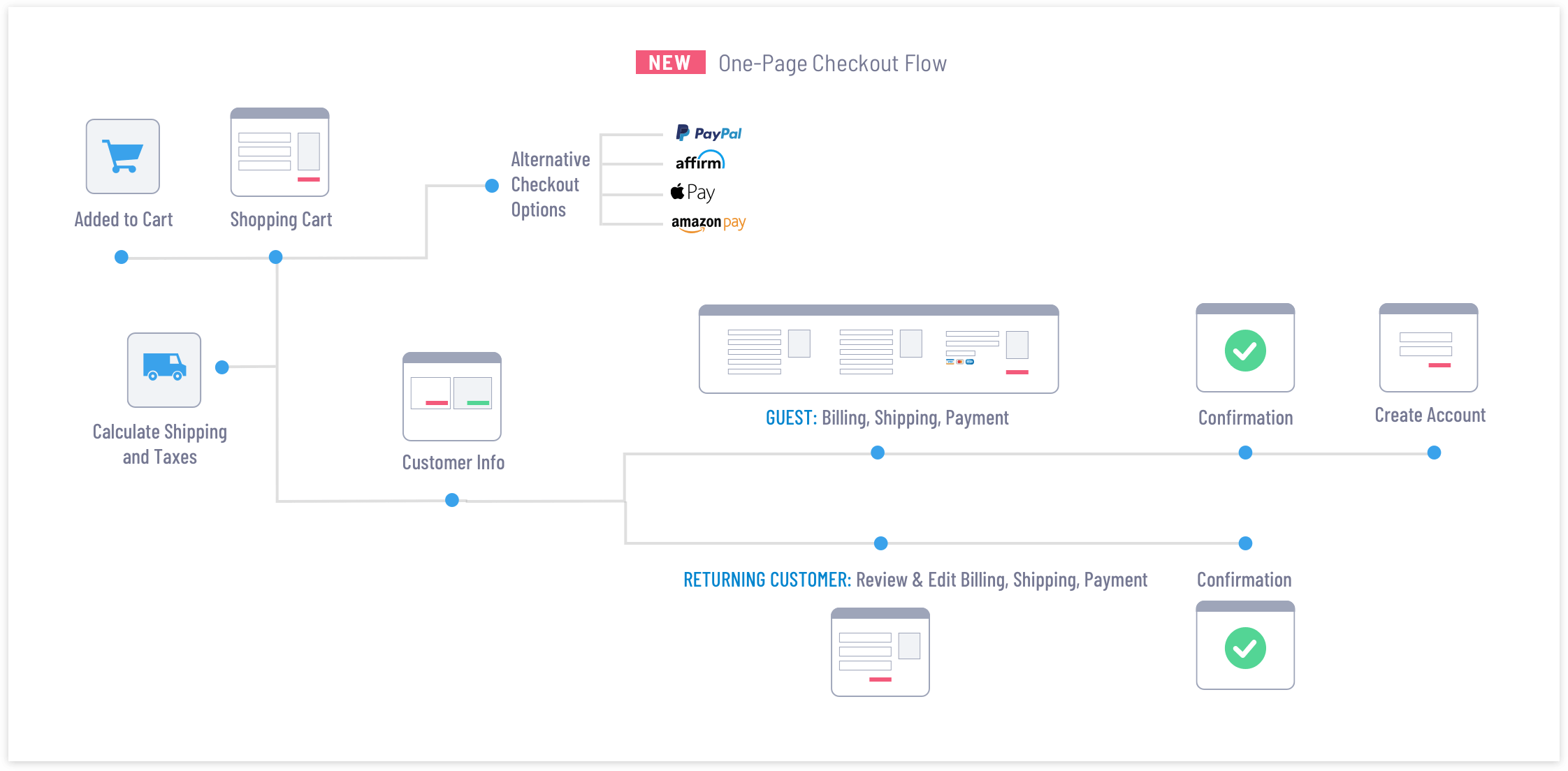
- Replace multi-steps checkout with one-page checkout flow.
- Include multiple checkout options: guest checkout and returning customer sign in.
- Ask only for the necessary information to make the input forms shorter.
- Retain previously entered information such as email address, shipping and/or billing info.
- Add input fields validation to highlight errors and help customers easily correct them.
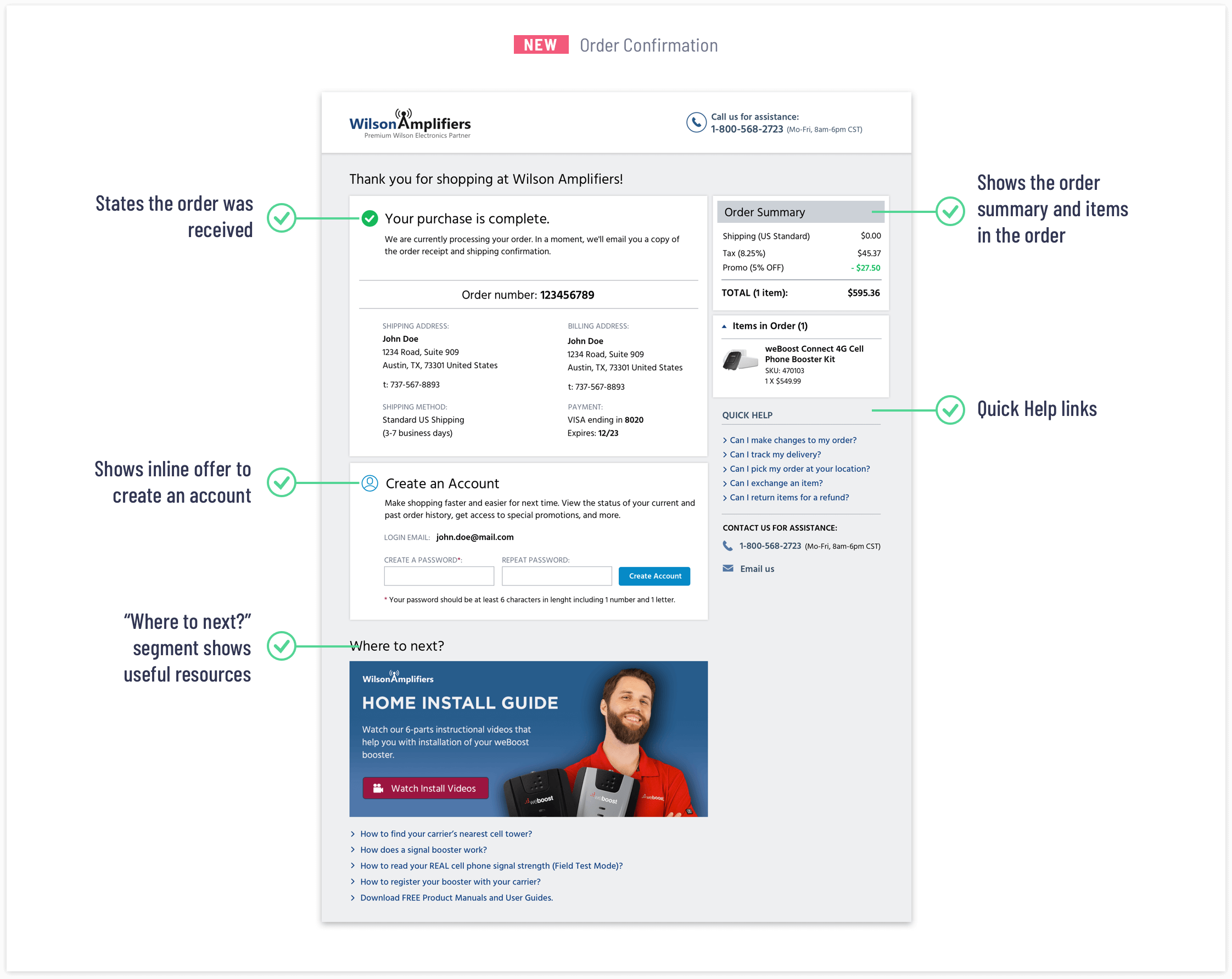
- Show order confirmation page, offer helpful information, and outline the next action steps.
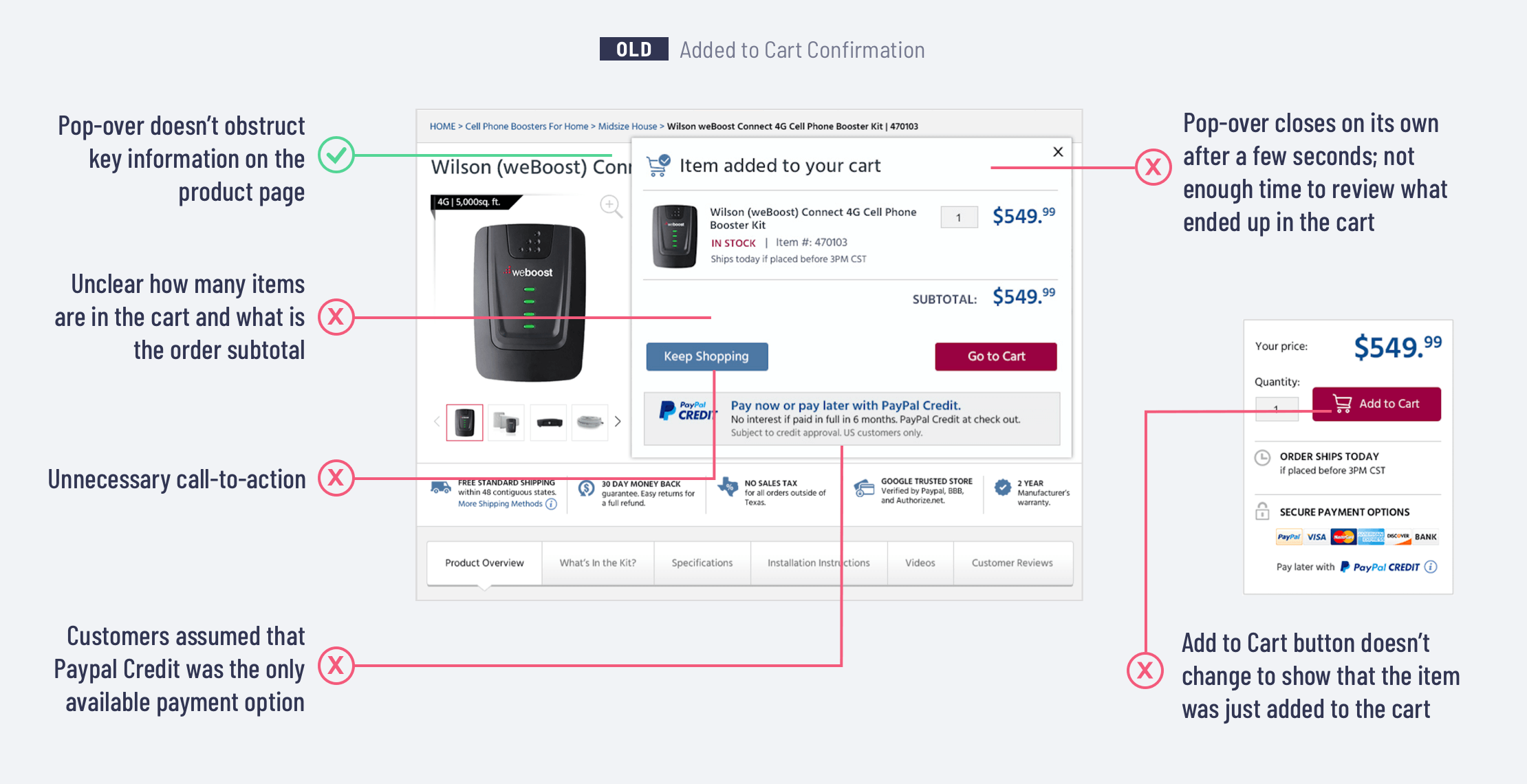
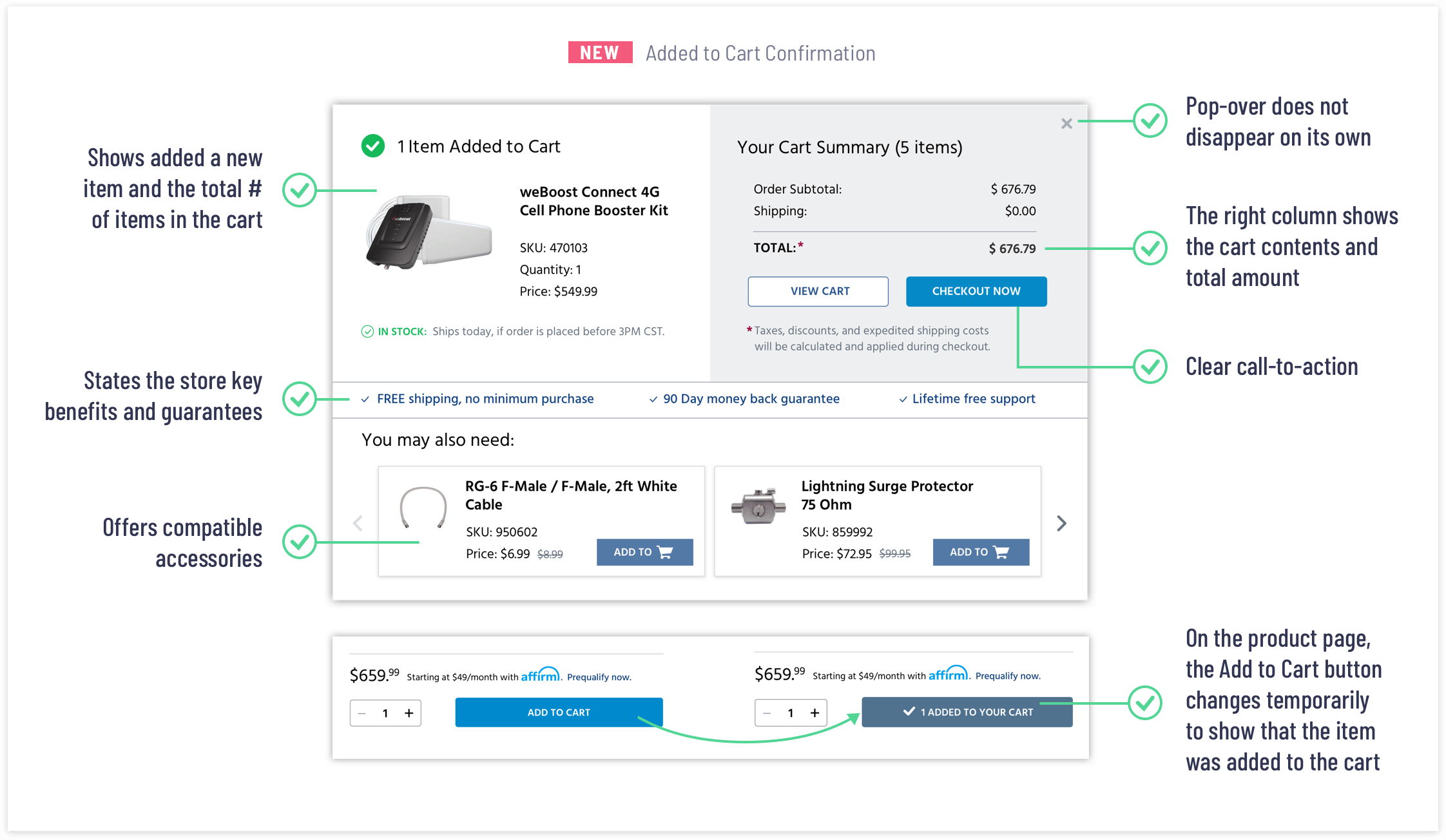
Adding an item to a shopping cart is an important step in the checkout process. To prevent shopping cart abandonment, it is important to give a confirmation message each time a customer adds an item to his/her cart. Without the confirmation, a customer may leave to look if an item has been added to the shopping cart or not. It is also useful to show the cart subtotal and provide clear calls to action. The old checkout process had the 'Added to Cart' confirmation pop-over, but there were several usability issues that I corrected in the revised design.
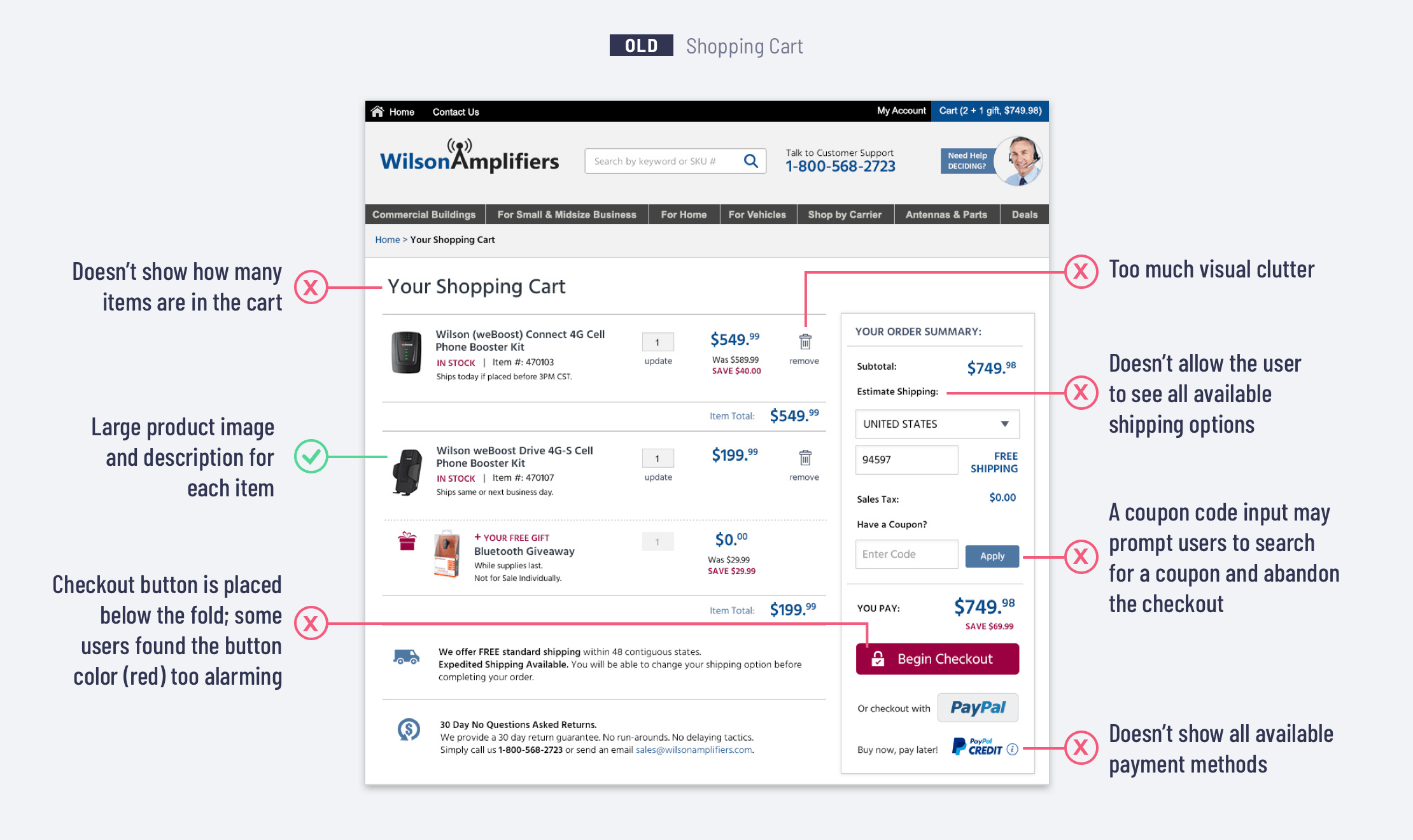
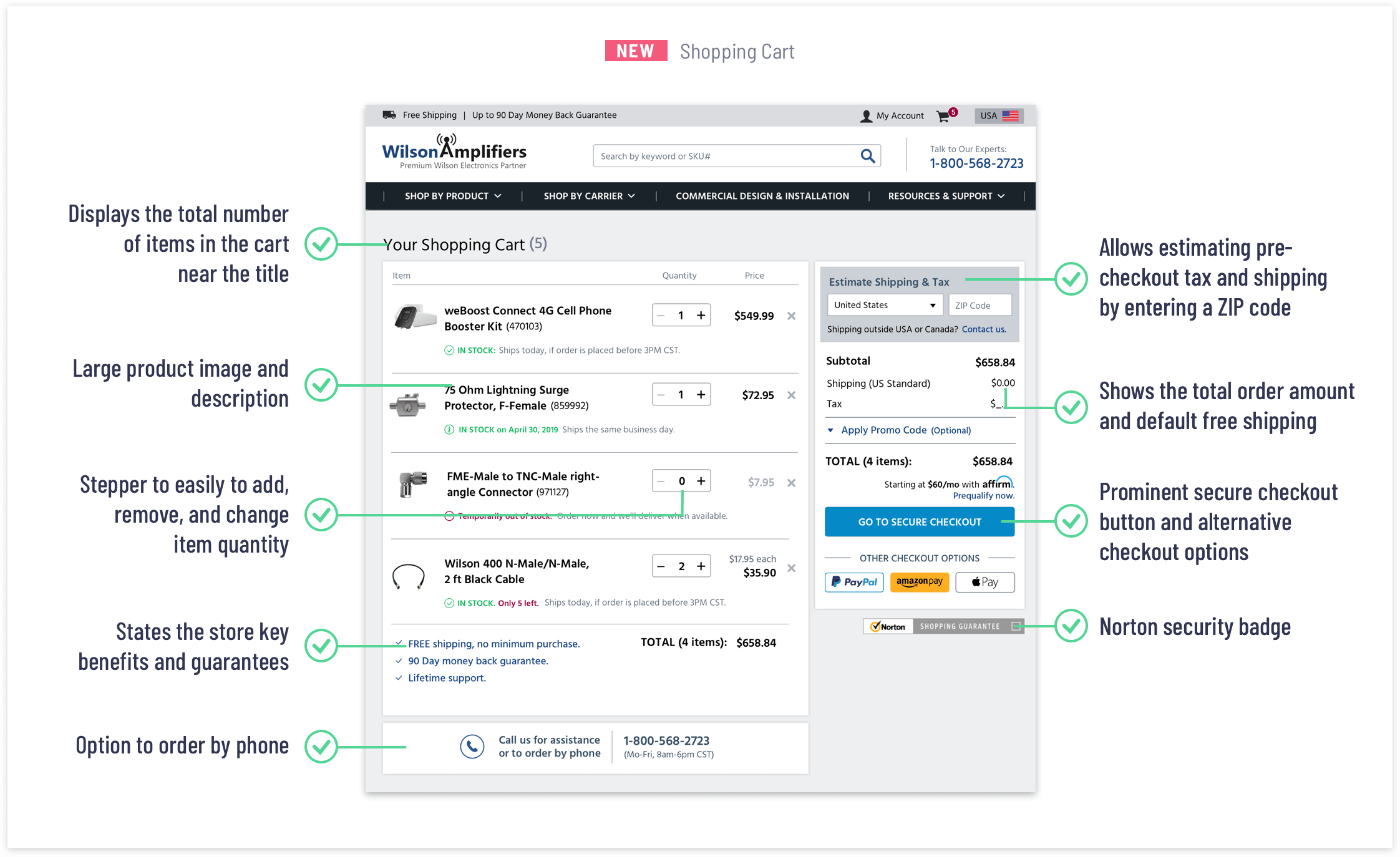
At the Shopping Cart page, customers make their purchase decision. Customers need to be able to review and compare products they have chosen, understand how much they will pay, see the shipping cost, apply promo discounts, and be comfortable with any additional charges. My redesign and optimization efforts were focused on helping shoppers feel confident to begin the checkout.
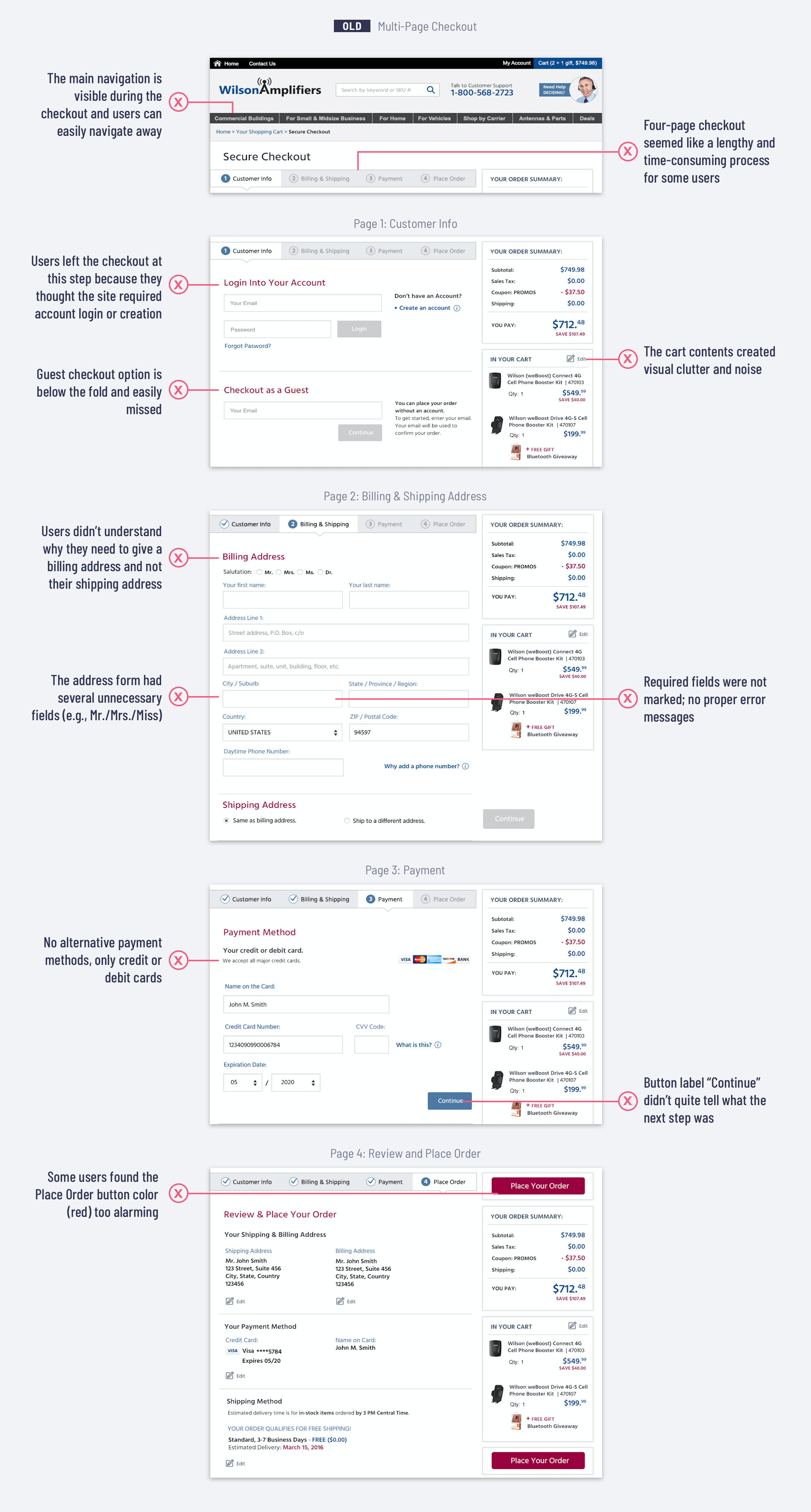
The beginning of the checkout process is where we noticed a significant spike in transaction abandonment. I wanted to improve usability and reduce the overall complexity of the process, to make sure the checkout is easy to complete. I also wanted to increase the perception of trust and the company’s credibility and make sure shoppers feel secure about entering confidential payment information. It was also imperative to design a mobile flow that is optimized for mobile devices.
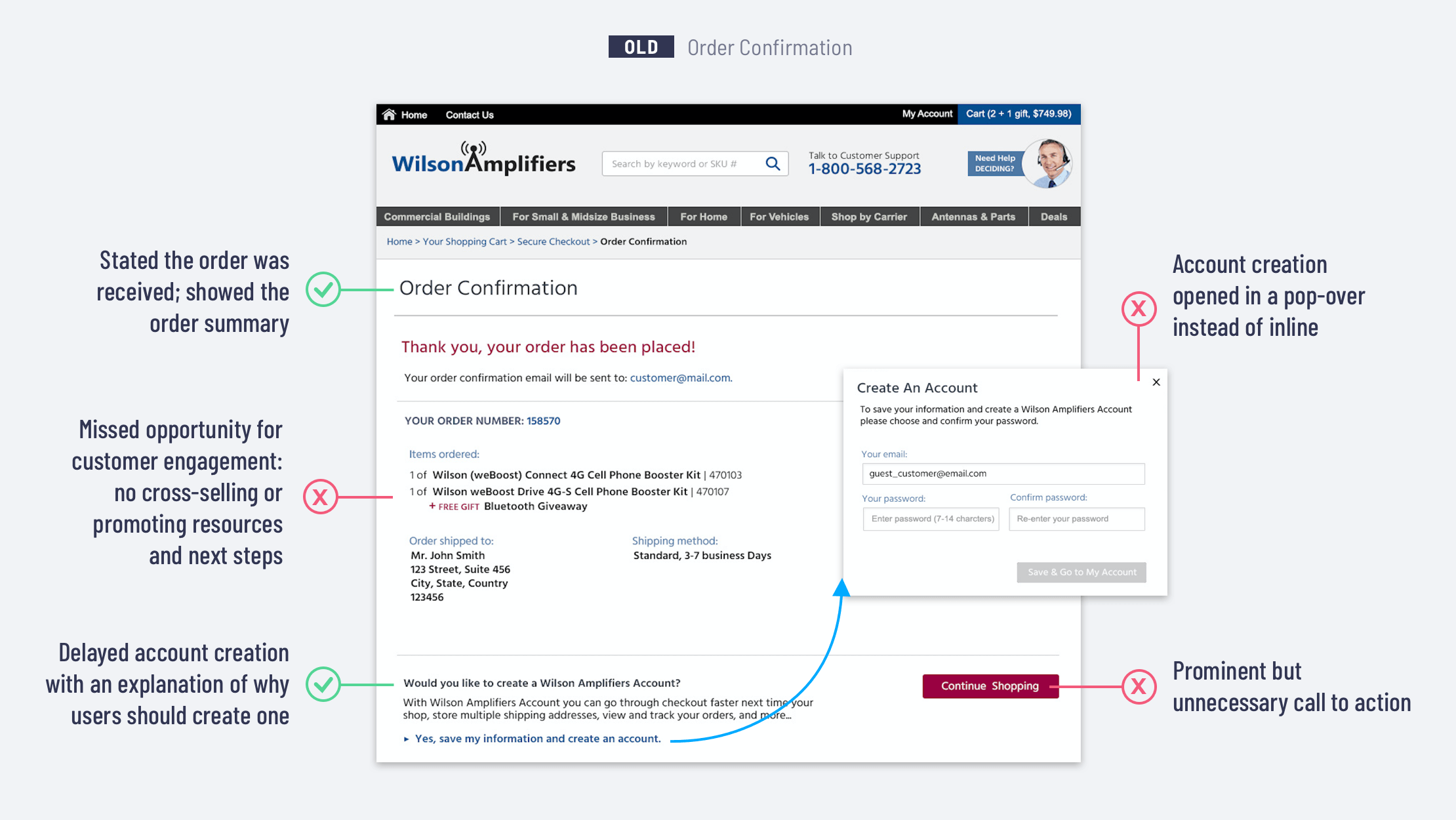
The order confirmation or ‘Thank you’ page is the checkout flow step that is often overlooked. I wanted to update this page so it is more engaging and useful. I moved an account creation option to the confirmation step, which simplified the checkout process. I also added to the confirmation page helpful resources and relevant blog posts that provide how-to information about installation and troubleshooting.
When the hi-fidelity mockups were ready I created clickable desktop and mobile prototypes in InVision App. The team and I wanted to make sure that the interface would work well on mobile devices. We run quick user testing (i.e., qualitative test to check usability and task completion success rate) for the desktop and mobile checkout prototypes. The user testing results largely validated the designs: people found one-page checkout easier to use and more convenient, they could see their current location in the checkout process, could also easily go back and edit the previous step entry, and feel confident that the order was placed successfully.
Compared with the old checkout, the revised shopping cart and checkout experience increased the conversion rate by 17%. As a result, more customers were comfortable placing their orders online instead of calling the customer support. The customer support team also reported a significant drop in calls about issues with the checkout, payment, and order confirmation. The redesign goals we set at the beginning were met.
- Empathy and user research is the key: understanding what frustrates users, what frightens and stops them, or what delights them is super important.
- UX should be data-driven: UX is a creative process, but without reliance on data (user research, analytics, metrics), it cannot be as effective. Monitoring, analyzing, and optimizing are important parts of the UX process.
- Collaboration with the entire team. UX is really about constant communication, not just the artifacts. Communicating early and often, engaging stakeholders, developers, and customer support teams can help getting valuable feedback and achieve the best results.